
Faculty Accessibility Support
Accessibility is a core part of equity in online education. When we design course materials with accessibility in mind, we actively reduce barriers and create more equitable opportunities for all students.
Title II of the Americans with Disabilities Act (ADA) requires all public institutions to ensure that digital content meets the Web Content Accessibility Guidelines (WCAG) 2.1, Level AA. This standard applies to all content created and shared through Canvas, including course pages, uploaded documents (PDFs, Word files, slide decks), images, and video or audio materials. As you build and update your courses, keeping these standards in mind helps ensure your content is usable and accessible for all students.
Accessibility Within Canvas
Canvas provides built-in tools that support accessible course design. The tools below are available to you now and are a strong starting point. Learn more about the strengths of each tool:
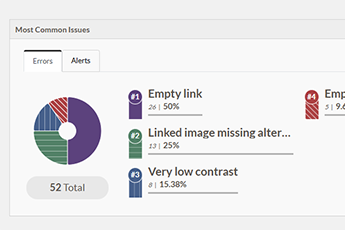
PopeTech Course Dashboard
The PopeTech Accessibility Dashboard provides a a quick, easy-to-understand snapshot of the most common accessibility issues in a whole Canvas course. It helps faculty prioritize and address issues based on the number of occurrences and types of content.
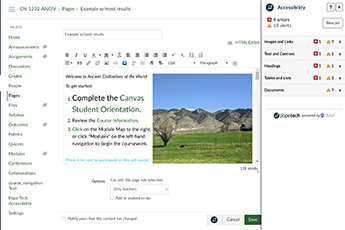
PopeTech Accessibility Guide
The PopeTech Accessibility Guide can be used to identify and fix accessibility issues within individual Canvas pages, announcements, quizzes, and assignments. The PopeTech integration is available within the editing workflow when updating content.
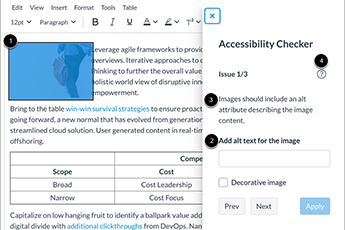
Canvas Accessibility Checker
Canvas includes an Accessibility Checker within the Rich Content Editor that helps identify similar and complementary accessibility issues as faculty build content.
Accessibility Resources for Materials within Canvas
The following resources have been curated by Distance Education to support your work. They include links to practical how-to guides to help you apply accessibility guidelines as you build your course content.
Learning Opportunities and Support
Local Connections
- DE offers a variety of workshops that incorporates accessibility practices and how-to opportunities for improving course materials.
- Scheduled 1:1 sessions with a team member to help you understand Canvas accessibility tools and build confidence in applying best practices (please note: we do not remediate content on your behalf).
Self-Paced Courses and Monthly Training
- Self-Paced Courses: Access free self-paced courses hosted on the @ONE Canvas Catalog. Recommended tracks include Accessibility Basics, Practical Accessibility Planning, and Social Media Accessibility
- Webinars and Workshops: Monthly Accessibility Training covers specific web accessibility topics like using the Pope Tech scanning tool or getting started with manual testing.
- Part 1: Accessibility in Online Learning Webinar Recording
This webinar highlights key changes from the revised ADA Title II regulations, effective April 24, 2026, and how they impact faculty across California Community Colleges. - Part 2: Using Accessibility‑Aligned AI to Move Courses Toward the Revised ADA Title II Recording
Designed specifically for California Community Colleges faculty, this webinar highlights practical, faculty‑centered strategies for implementing the new ADA Title II regulations. The session will also spotlight CVC@ONE Peer Online Course Review (POCR) Exchange courses as well as key Accessibility Center resources and micro‑courses.
AI Tools
- Universal Access Bot: remediates Canvas content for WCAG 2.1 AA compliance and UDL
- ADA Access Coach: answers questions about ADA Title II Updates
Student Accommodations
While we support faculty in building accessible Canvas courses, questions about student
accommodations or how to implement them should be directed to the Disabled Programs and Services (DPS) Office.
